
What Breaks Between a Sign Design File and the Router or Cutter
- July 16, 2026
- Prepress Services
- Kevin Bharmal
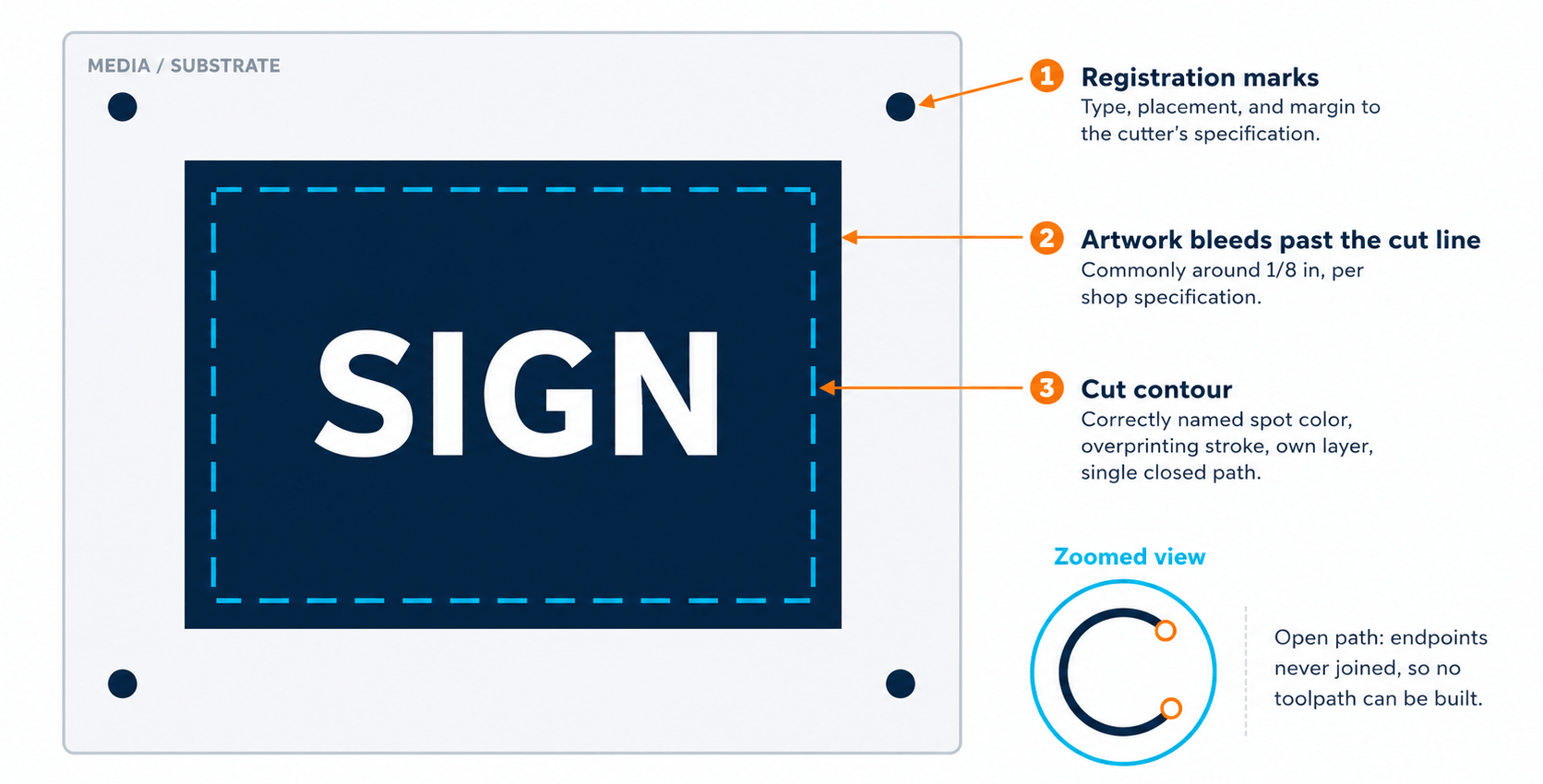
A sign design file can look flawless on screen and still fail the moment it reaches the router or cutter. The artwork is approved, the client is happy, and then the operator opens the file and finds paths that will not close, cut lines the software cannot see, and corners the bit physically cannot reach.
Nearly every one of these problems starts at the design stage, long before the file touches the shop floor. Proper sign file preparation for cutting requires more than artwork that looks correct on screen. Here are the failure points that come up most often, and how to catch each one before material is wasted.
Table of Contents
ToggleOpen Paths and Stray Anchor Points
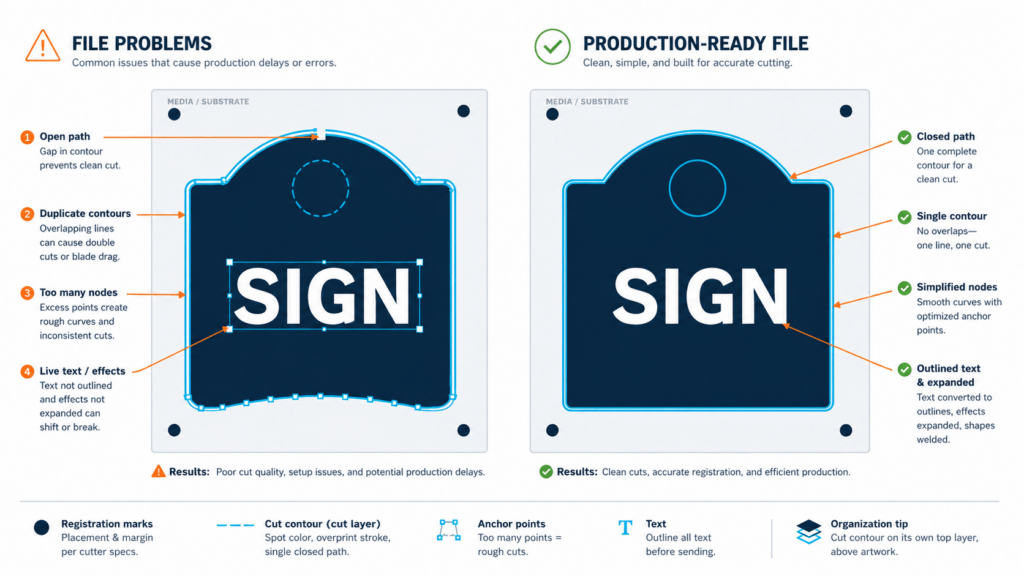
Cutting software needs closed vector paths to build a toolpath. A path that looks closed on screen can still have endpoints sitting a fraction of a millimeter apart, and gaps like these are among the most common problems we find in files prepared for sign shops. When that happens, the software either rejects the shape or cuts something unpredictable.
Stray anchor points, empty paths, and leftover guide fragments cause the same confusion. The machine has no way to know which geometry matters.
The fix is unglamorous. Zoom in on every join, delete isolated points and empty objects, and run path validation until every cut shape reads as one closed contour.
Cut Lines the Cutter Cannot Identify
Most production workflows expect cut contours in a dedicated spot color, named exactly to the convention the shop’s RIP or cutting software recognizes. A cut line drawn in a process color, or a spot color with one character off in the name, is invisible to the cutter.
The RIP treats it as printable art instead. Best case, the job sits on hold while someone rebuilds the file. Worst case, the finished sign ships with a printed outline where the cut should have been.
Confirm the spot color name character for character, set the cut line as an overprinting stroke so it does not knock out the art beneath it, and keep contours on their own named layer. Shops that take files from many designers often push this step through dedicated wide-format prepress services so every file arrives at the queue normalized to one standard.
Live Fonts and Effects That Never Became Vectors
The cutting system will rarely have the same fonts installed as the design workstation. Live text substitutes or drops when the file opens elsewhere, and a substituted font changes every cut path in the job.
Live effects fail the same way. Drop shadows, glows, warps, and brush strokes are raster or dynamic data until they are expanded, and none of them can be cut as drawn.
Convert text to outlines. Expand every appearance and effect. Then inspect the file again, because expanding effects has a habit of creating the exact open paths and stray points described above.
Scale, Units, and Artboard Mismatches
Large signs are often designed at reduced scale, and that is fine as long as the scale is documented and applied consistently. The trouble starts when a file arrives at one-tenth scale with no note anywhere, or one element was pasted in at full size while the rest was not, or the document units do not match what the cutting software expects on import.
A four-foot letter that imports at four inches wastes machine time at best and a full sheet of material at worst.
State the scale in the file name and on a notes layer. Keep every element at the same scale. Confirm units before export.
Duplicate and Overlapping Paths
Copy and paste habits leave invisible duplicates stacked directly on top of each other. The screen shows one shape. The machine cuts it twice, doubling cut time and often burning or melting the substrate edge on the second pass.
Overlapping shapes that were never welded do the same damage through crossing toolpaths and torn material. Select everything, compare the object count against what the design should actually contain, and weld overlaps into single contours before the file goes anywhere.
Corners Tighter Than the Bit
A round router bit cannot cut a square interior corner. If the design calls for a sharp inside corner and the bit is a quarter inch, the machine leaves a radius. Letterforms with fine serifs or tight counters can lose their shape entirely.
No file cleanup changes this. It is physics.
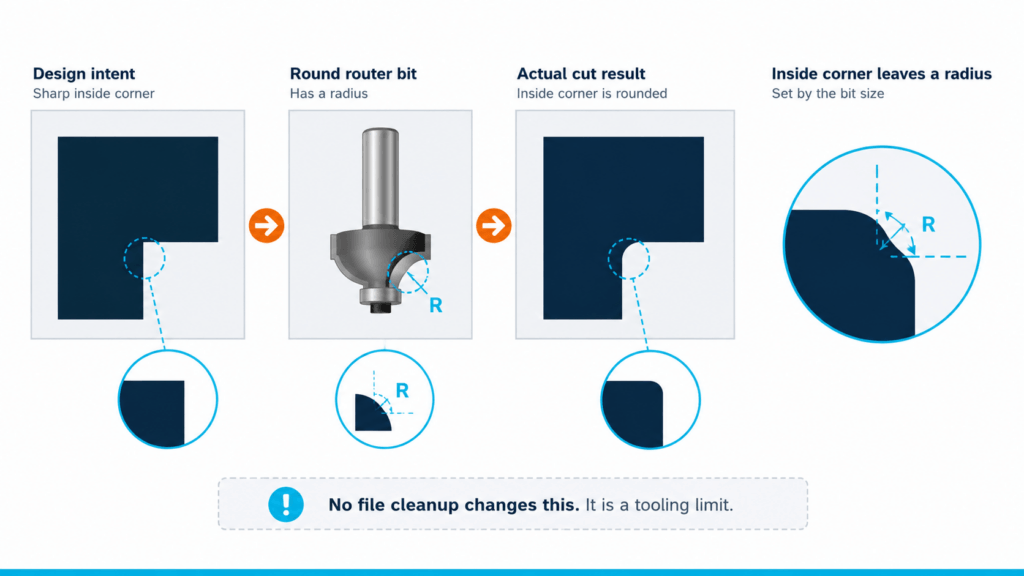
Know the minimum tool radius the shop runs and design interior details to that limit. Where a sharp interior corner is unavoidable, plan for overcut relief or move that element to a different production method.
Missing Bleed and Registration on Print and Cut Jobs
Printed graphics that will be contour cut need bleed extending past the cut line, commonly around an eighth of an inch, although the exact requirement should follow the shop’s cutter, media, and registration specifications. Without it, the smallest drift in registration exposes a white edge on the finished piece.
Registration marks deserve the same respect. The wrong mark type, wrong placement, or artwork crowding the marks will stop an automated cutter cold.
Extend the art past every cut contour, place marks to the cutter manufacturer’s specification, and leave a clear margin around them.
Too Many Anchor Points
Auto-traced logos and expanded brush artwork can carry thousands of anchor points. Dense point data turns smooth curves into faceted segments, slows the machine, and leaves visibly jagged edges on the finished sign.
Simplify paths after tracing. Rebuild critical curves by hand where edge quality matters. Keep node counts as low as the shape allows.
A Preflight Pass Before the File Leaves Design
Before any file is released to production, verify the following:
- Every cut shape is a single closed path with no strays
- Cut contours sit in a correctly named spot color on a dedicated layer
- All text is outlined and all effects are expanded
- Scale and units are documented and consistent
- No duplicate or overlapping paths remain
- Interior corners respect the tool radius
- Bleed and registration marks meet the cutter’s specification
- Node counts are reasonable on every contour
Ten minutes of preflight costs less than one ruined sheet of aluminum composite, and far less than a missed installation date.
Get Production-Ready Files Without Slowing Down Design
Alpha Prepress has prepared production-ready files for sign shops and wide-format printers since 2006 via the Alpha BPO group. Dedicated specialists check, correct, and release files on a same-day or overnight basis, depending on scope, so machines keep running and designers stay on design.
Explore outsourced prepress services to see how file preparation fits into an existing workflow, or book a call to set up a free trial job.
