
What Is Preflighting? A Guide to Prepress Preflight Services
- August 10, 2026
- Prepress Services
- Kevin Bharmal
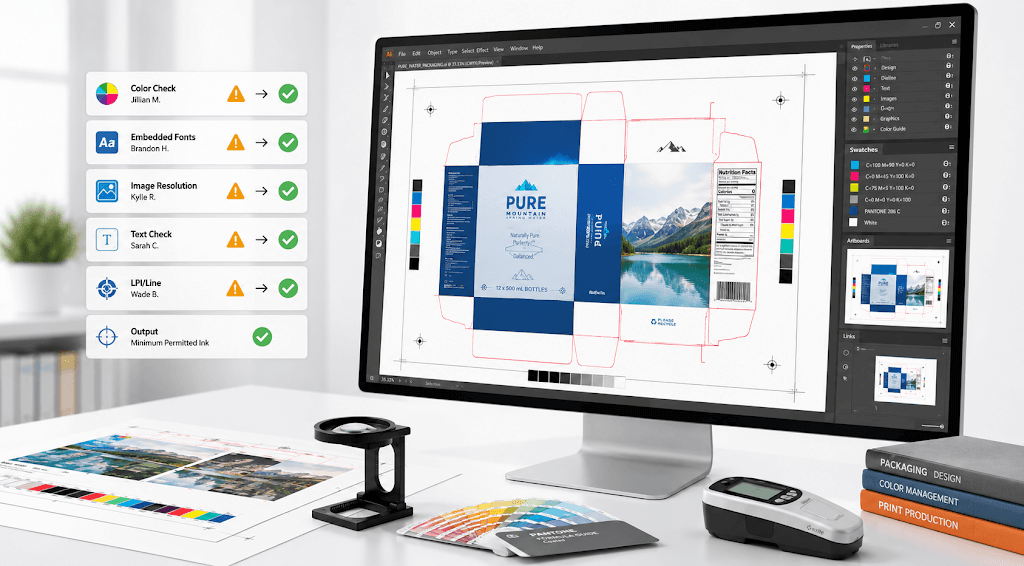
A print file can look finished on screen, pass a quick visual check, and still be wrong. A logo built in RGB. A font that was never embedded. An image that looks sharp at screen size but breaks up at print size. A dieline was left on the wrong layer. None of these announces itself, and none prevents the file from being sent. They surface later, on the plate, on the press, or on the finished job, where fixing them costs the most, and the deadline has the least room to absorb it.
Preflighting is the step that catches these problems while they are still cheap to fix. It checks a print file against the requirements of the job it will actually run, before that file goes to the plate or press. It is one of the quiet, unglamorous stages of professional prepress services, and also one of the most important, because almost every expensive print failure traces back to something a proper preflight would have caught.
This guide explains what preflighting is, the two layers a real preflight involves, exactly what a preflight check covers, how PDF standards keep files print-ready, and what an outsourced preflight service does that a quick software pass does not.
Table of Contents
ToggleWhat Is Preflighting?
In simple terms, preflighting is a technical file check performed before printing to ensure a file is ready for production. More fully, it is the process of inspecting a digital print file to confirm it meets the technical requirements for reliable output. The name is borrowed from aviation, where a pilot runs a preflight checklist before takeoff. The idea is the same: check everything on the ground, because problems are far more expensive once you are committed.
In practical terms, a preflight verifies that every element a press needs is present and correct, fonts, images, colors, bleed, and file structure, all measured against the output condition the job will print in. A file that passes is print-ready. A failing file is returned with the specific problems identified, so they can be corrected before anything is committed.
Prepress preflight sits at the start of the prepress workflow, usually as the first gate a file passes through, because there is no point trapping, imposing, or proofing a file that was never viable to begin with.
Where Preflight Fits in the Prepress Workflow
Preflight is the first checkpoint in prepress, not the last. A file arrives, and before any production work begins, it passes preflight. Only once it clears does the rest of the sequence follow: color setup and trapping, imposition or step-and-repeat, proofing, and final output to plate or press.
Placing preflight first is deliberate. Every stage after it assumes the file is sound, so a fault that slips past preflight is carried forward and multiplied by everything built on top of it. Catching a missing font at preflight is a two-minute fix. Catching the same font after imposition means redoing the work in between. The earlier a problem is found, the smaller it is.
The Two Layers: Automated and Human
A complete preflight is really two checks, not one.
- The first is automated. Software compares the file against a set of rules and flags any violations: missing fonts, low-resolution images, stray RGB in a CMYK job, objects outside the trim, ink coverage over a ceiling, and non-conforming file structure. Checked against recognized print-ready PDF rules, this pass is fast, consistent, and clears the large majority of files before a person spends time on them.
- The second layer is human judgment, and it catches what no rule can. A file can be technically flawless and still be the wrong file: an old dieline revision, a version the client never approved, a brand color that is reproducible but not the shade the brand signs against, or prep that does not match the real press and substrate. Those are questions of intent, not syntax. A closer look at what automated preflight misses shows where that gap opens in real production.
The rule in one line: Automated preflight answers whether the file is valid. A person answers whether it is the right file. A preflight service worth the name does both.
The Preflight Checklist: What Gets Checked
A thorough preflight works through a consistent set of file properties. The exact profile is matched to the output, but the core list is stable, and it can be run on any print file before release:
- Fonts: every font embedded or outlined, with no substitution.
- Image resolution: raster images at a resolution suited to the final output, not just to the screen.
- Color mode: CMYK or named spot colors, as required, with stray RGB or unintended spot colors flagged.
- Bleed and trim: artwork extended past every trimmed edge, with trim and safe zones respected.
- Overprint and knockout: set so colors behave as intended, with no accidental knockouts or unexpected overprints.
- Transparency: handled correctly for the output, and flattened where the workflow requires it.
- Total ink coverage: kept within the limit for the substrate and process.
- Separations: clean, with the correct number of plates and no rogue colors.
- Structural layers: dieline, cut, and finishing layers are named correctly and held out of the printed output.
- Barcodes: present, correctly built, and viable for the print process.
- Trapping: reviewed so small registration shifts do not open gaps between colors.
- PDF conformance: the file conforms to a recognized print exchange standard.
Each item maps to a specific failure it prevents. Skip the resolution check and a logo prints soft. Skip the color-mode check, and an RGB black prints as a muddy build. The value of a preflight check is that it runs the entire list every time, rather than trusting that nothing slipped through.
What a Missed Error Actually Costs
The reason preflight matters is not the check itself. It is what a missed check costs once the job has moved on. A problem caught at preflight is a file edit. The same problem, caught later, is that production has already been spent.
The cost also climbs the further downstream it travels. An error found in proofing sets back one stage. The same error found at the finishing line can lose the whole run, because everything built on top of the faulty file has to be redone with it.
This is why preflight sits first, and why it runs on every file rather than only the ones that look risky. The check is cheap. The miss is not.
PDF Preflight and Print-Ready Standards
Most print files travel as PDFs, which is why a PDF preflight service is central to modern prepress. A PDF can contain elements that some print workflows cannot process correctly, so the print industry adopted a constrained family of print-ready PDF standards, known as PDF/X under ISO 15930, that reduce a PDF to what a press actually needs.
Two are worth knowing. PDF/X-1a is the conservative choice: CMYK and spot colors only, no RGB, fonts embedded, transparency flattened, and no layers. Everything is resolved at the design stage, so what is sent is what prints, which makes it safe across older and simpler workflows.
PDF/X-4 is the more modern option: it allows live transparency, layers, and color-managed data, and passes more of the processing to the RIP. It suits current digital and packaging workflows, but only when the receiving system supports it.
A PDF preflight service confirms the file meets the right standard for the job and catches the failures PDFs are prone to: stray RGB that should have been converted, live transparency in a workflow that needs it flattened, fonts that were never embedded, a missing or incorrect output intent, and elements that will not separate correctly. Validating conformance during preflight prevents a PDF from failing quietly at the RIP.
Preflight as a Service
There is a difference between running a preflight and having a preflight service. Any designer can run a software check. A preflight service means the checking, the judgment, and the correction are handled for you, by a prepress team whose job is to catch what the deadline and the workload cause an in-house operator to miss.
A real preflight service does more than flag problems. It corrects them, or specifies exactly what has to change, and returns the file press-ready rather than handing back a report. It checks against the actual output condition, not a generic profile. And it applies the human layer, confirming revision, approval, and press fit, not just the software pass. This runs as part of broader commercial print prepress services, so a file that clears preflight moves cleanly into trapping, imposition, and output.
For print operations under deadline pressure or covering a capacity gap, this is where an outsourced team pays for itself. Files come back checked, corrected, and ready to run, with same-day or overnight turnaround depending on scope, so press time is spent printing rather than troubleshooting.
Catch File Problems With Prepress Experts Before They Reach the Press

Every file that reaches a press carrying a problem is a schedule waiting to slip. A print problem caught at preflight costs minutes; the same problem caught on press costs a rerun.
Alpha Prepress has supported print operations for 20+ years, since 2006. The team checks each file against the real output condition, corrects what needs correcting, and returns it press-ready to recognized standards.
Fonts, color, bleed, separations, and PDF conformance are all confirmed for you, with same-day or overnight turnaround depending on scope, quietly and under your own label.
Send us your next file, or schedule a call to talk through your prepress workload.
Frequently Asked Questions
What does a preflight check include?
It confirms the file’s fonts, images, color, bleed, structure, and PDF conformance are all correct for the intended output. The full checklist is covered above; the short version is that everything a press needs is present, and nothing it cannot use is left in.
How is a preflight different from a proof?
A preflight checks whether the file is correct and printable. A proof shows what the printed result will look like for approval. Preflight comes first and is about technical readiness; proofing comes later and is about visual sign-off. A file should clear preflight before a proof is even worth producing.
What is a PDF preflight?
A PDF preflight confirms a print PDF meets a print-ready standard such as PDF/X under ISO 15930, and catches PDF-specific problems like stray RGB, unflattened transparency, unembedded fonts, or a missing output intent.
