
Why Label Files Fail on a Flexo Press (and the Prepress Fixes That Stop It)
- July 16, 2026
- Packaging Prepress
- Kevin Bharmal
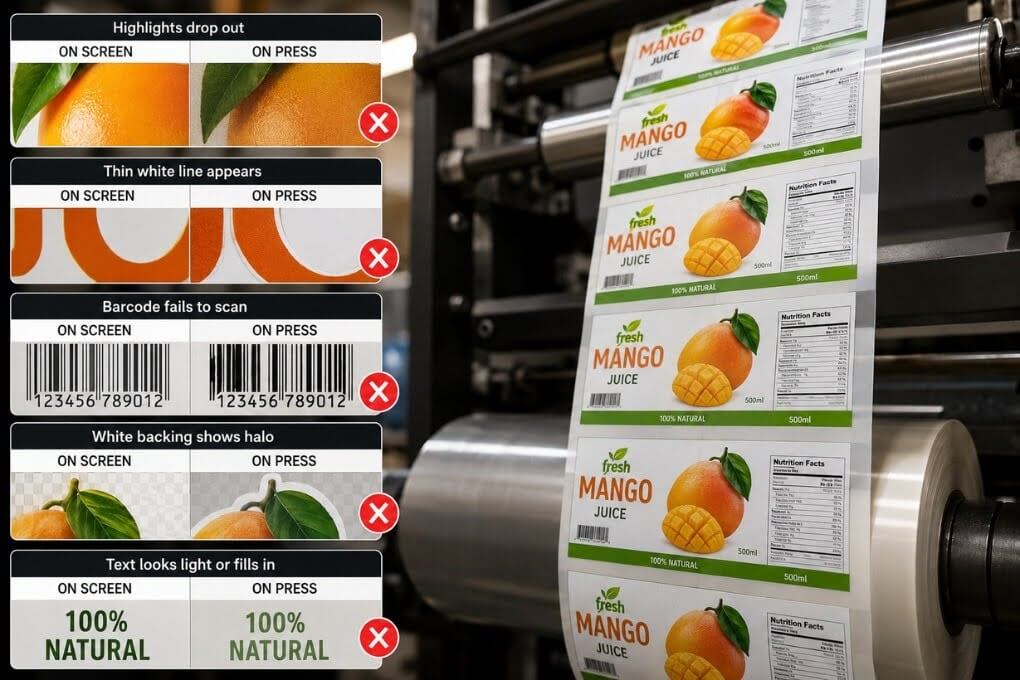
A label file can pass every on-screen check and still come apart the moment it reaches a narrow-web flexo press. Highlights that looked crisp drop out to bare substrate. A thin white line opens along a color edge that was solid in the proof. A barcode that is scanned fine on the monitor fails at the verifier. A white backing that seemed clean leaves a halo around the artwork on a clear label. None of these is a design problem. They are file problems, and flexo is the process least willing to forgive them.
Flexo prints from a raised relief plate that presses ink onto the substrate, and that physical contact changes how art behaves. Ink spreads at the edges, the smallest dots either hold or vanish depending on the plate, and colors gain as they run. A file built without those realities in mind looks right everywhere except the one place that matters. Sound label prepress closes that gap and is a core part of professional packaging prepress services.
This guide covers the file failures that most often stop a pressure-sensitive label job on a flexo press, and the prepress fix that prevents each one.
Table of Contents
ToggleWhat Makes Flexo Unforgiving
Flexo prepress starts from a simple fact: the plate is physical, and physical plates behave differently from a screen or a laser. The relief image squeezes ink onto a moving web at speed, so edges gain, fine detail can flood or fall away, and every color has to land in register with the ones printed before it.
Narrow-web label work adds tight tolerances, repeat layouts across a roll, and finishing steps like lamination and die cutting that all depend on the file being right first.
A commercial offset file dropped straight onto a flexo press rarely survives that environment intact. The failures below are the ones that show up most often, and each traces back to a specific prep decision that either was or was not made before the plates were imaged.
What Causes Highlight Dropout in Flexo Printing?
A soft gradient or a delicate highlight can look perfect in the file and print as a bare substrate on the label. This happens because every flexo plate has a smallest dot it can reliably hold. Tones below that threshold do not print lighter; they disappear, leaving a hard edge where the highlight was supposed to fade to nothing.
The fix is to prepare the file for the plate, not for the screen. That means knowing the minimum dot for the plate technology in use and applying the tonal curve, sometimes called a bump or minimum-dot curve, that lifts the smallest printable tones up to where the plate can hold them and controls gain in the midtones.
Modern flat-top plate technology holds finer highlights than older round-top plates, but the principle is the same: the file has to respect what the plate can render. Preparing highlights this way, in line with FTA FIRST practice for flexo, is the difference between a clean vignette and a highlight that breaks off mid-fade.
How Do You Prevent White Gaps Between Colors?
Two colors that share an edge in the file can print with a thin sliver of white between them on press. Flexo registration is tight but not perfect, and as the web moves, adjacent colors shift by a hair relative to each other. Where they were built to butt exactly, that shift opens a gap the eye reads immediately.
Flexo trapping prevents it by overlapping the two colors slightly, so a small shift still leaves no bare substrate showing. The trap has to be sized to the press and substrate, generous enough to cover normal registration variance but tight enough not to create a visible dark line of its own.
Spot colors, which are common on labels for brand accuracy, need particular attention because each one is a separate plate that has to register with the rest. Trapping is not a setting to leave on autopilot; on critical brand artwork, it is reviewed deliberately.
- Prepress rule: On brand-critical spot colors, do not trust automatic trapping blindly. The lighter color spreads into the darker one, so the darker color keeps its visual edge, which prevents a muddy dark line where the two meet.
Why Do Clear and Metallic Labels Need a White Underprint?
Pressure-sensitive labels are often printed on clear film or metallic stock, and on those substrates, color needs a white layer printed underneath to look right. When that white underprint is missing, built in the wrong place, or handled incorrectly, the label prints are washed out on clear film or takes on the mirror of the metal beneath it. When the white is there but set to knock out instead of overprint, or is not choked slightly under the color, a white halo appears around the artwork wherever registration drifts.
The fix is a dedicated white layer, named clearly and set as a spot, built to overprint so it does not punch a hole in the color above it, and choked a small amount, about 0.008 inch (0.2 mm), so the white sits just inside the color edge rather than peeking out past it.
On clear labels, the prepress team also has to decide where white is needed and where the substrate should show through, which is a design-intent decision that has to be confirmed, not assumed.
- Prepress rule: Build white as its own named spot, set it to overprint, and choke it under the color. A white that knocks out, or one left unchoked, is exactly what creates the halo around the artwork.
What Goes Wrong with Step and Repeat on the Roll?
A single label can be perfect, and the imposed roll still wrong. Step and repeat lays the label out across and around the web to match the die and the press, and small errors here waste stock by the roll rather than by the sheet.
The usual failures are the wrong gap and gutter between labels, spacing that does not match the die tooling, labels flipped or rotated incorrectly for the way the roll unwinds, and missing anchor or bearer elements that the press relies on.
The fix is to step the artwork to the actual die and press specification, not to a generic grid. That means confirming the dieline setup, the unwind direction, and the finishing path before imposing, so the repeated file matches the tooling exactly. Getting this right up front is also where turnaround is protected, because a step-and-repeat error usually is not caught until material is already running.
Why Do Barcodes Fail Verification on a Flexo Press?
A barcode can look flawless in the file and still fail a verifier on the finished label. Ink gain on flexo thickens the bars as they print, which narrows the spaces between them and pushes the code out of tolerance. Add a poor color choice, a cramped, quiet zone, or an orientation that fights the print direction, and a scannable code becomes an unreadable one.
The fix is a barcode preparation built for the process. A bar width reduction, sized to the press and substrate, thins the bars in the file so they return to the correct width on press. Quiet zones are kept intact, the code is placed on a flat area with adequate contrast, and it is verified against a recognized grade standard such as ISO/IEC 15416 rather than judged by appearance alone.
Bar and space color also matter, since not every color pair scans reliably. These checks are routine in label prepress, and they are exactly the kind of thing that never surfaces until a retailer’s scanner rejects the product.
- Prepress rule: Apply bar width reduction before output and verify to a recognized grade, not by eye. A barcode that looks perfect on screen can still fail a scanner once the ink thickens enough to obscure the bars on press.
How Much Ink Can a Flexo Label Take?
Two more failures round out the list.
- First, excessive ink coverage on the substrate can cause the label to flood, smear, or fail to dry, especially in rich shadows and heavy solids. Flexo work is commonly held to a total area coverage well below what a coated offset sheet tolerates, roughly in the 240-300 percent range depending on substrate and press, and files that ignore that limit cause problems on press.
- Second, fine reversed type and hairline rules can fill in or break up, because the detail below what the plate can hold behaves the same way a sub-minimum highlight dot does.
The fixes are straightforward once they are part of the routine: cap total ink coverage to the press and substrate, hold reversed type and thin lines above a safe minimum weight, and flag any element that sits below plate capability before the file is committed to plates.
A Preflight Checklist for Flexo Label Files
Run this before any pressure-sensitive label file goes to the plate.
- Highlights and gradients are prepared on the plate, with the appropriate tonal curve applied.
- Trapping built and reviewed for every color edge, sized to the press and substrate, spot colors checked individually.
- White underprint on clear or metallic stock built as a named spot, set to overprint, and choked slightly under the color.
- Step and repeat matched to the actual die layout, unwind direction, and finishing path.
- Barcodes prepared with a bar width reduction, intact quiet zones, scannable color pairing, and verification to a recognized grade standard.
- Total ink coverage capped to the substrate and press limit.
- Reversed type and hairline rules held above a safe minimum weight.
- Spot colors named consistently and matched to brand references, with no stray or duplicate swatches.
- File delivered in a stable, production-ready format built to recognized PDF exchange practice.
Why These Failures Cost More on Labels
Label work runs long and fast, and it does not stop at the press. A file error that survives to plate carries through lamination, die cutting, and rewinding before anyone sees the result, so a single missed check can scrap an entire roll and the finishing that went with it. The failures above are individually small and collectively expensive, which is why they belong in a disciplined preflight rather than a quick glance.
For converters running tight schedules or covering a capacity gap, outsourced prepress services can take on the label file-prep load, so press time is spent printing, not troubleshooting. A specialist team handles minimum dot, trapping, white management, step-and-repeat, and barcode verification, with same-day or overnight turnaround, depending on the scope.
Send Files That Print Right the First Time With Prepress Experts

A preventable file error should never scrap another roll. Alpha Prepress has handled label and packaging prepress for print operations for 20+ years, and returns files press-ready to recognized standards.
Minimum dot, trapping, white underprint, step and repeat, and barcode verification are all handled for you, with same-day or overnight turnaround depending on scope, quietly and under your own label.
Send us your next label file, or schedule a call to talk through your prepress workload.
Frequently Asked Questions
Why do highlights disappear on a flexo label?
Every flexo plate has a minimum dot it can hold. Tones lighter than that threshold do not print, so a delicate highlight drops to bare substrate. Preparing the file to the plate minimum and applying the right tonal curve keeps highlights intact.
What is bar width reduction, and why do labels need it?
Bar width reduction thins the bars of a barcode in the file so that ink gain on press brings them back to the correct width. Without it, gain thickens the bars, narrows the spaces, and pushes the code out of scannable tolerance.
Do clear labels need a white layer?
Usually, yes. Color printed directly on clear film or metallic stock looks washed out or picks up the substrate beneath it. A white underprint, built as a named spot, set to overprint, and choked slightly under the color, gives the artwork an opaque base.
What causes white gaps between colors on a flexo label?
Small registration shifts on the press move adjacent colors relative to each other. Where two colors were built to butt exactly, that shift opens a white sliver. Trapping overlaps the colors slightly, so a normal shift leaves no bare substrate showing.
